Promote on creators.gg
creators.gg is FirstLook’s public destination where creators discover programs and campaigns across the network. Listing there is the easiest way to reach creators outside your own community, and there are two things you can list, either or both:
- Your program — an ongoing front door for your creator program. Listing it lets you discover organic creators and bring them into your community, even when you have no campaign running.
- An individual campaign — a time-boxed push that activates the creators in your program around a specific marketing beat or moment.
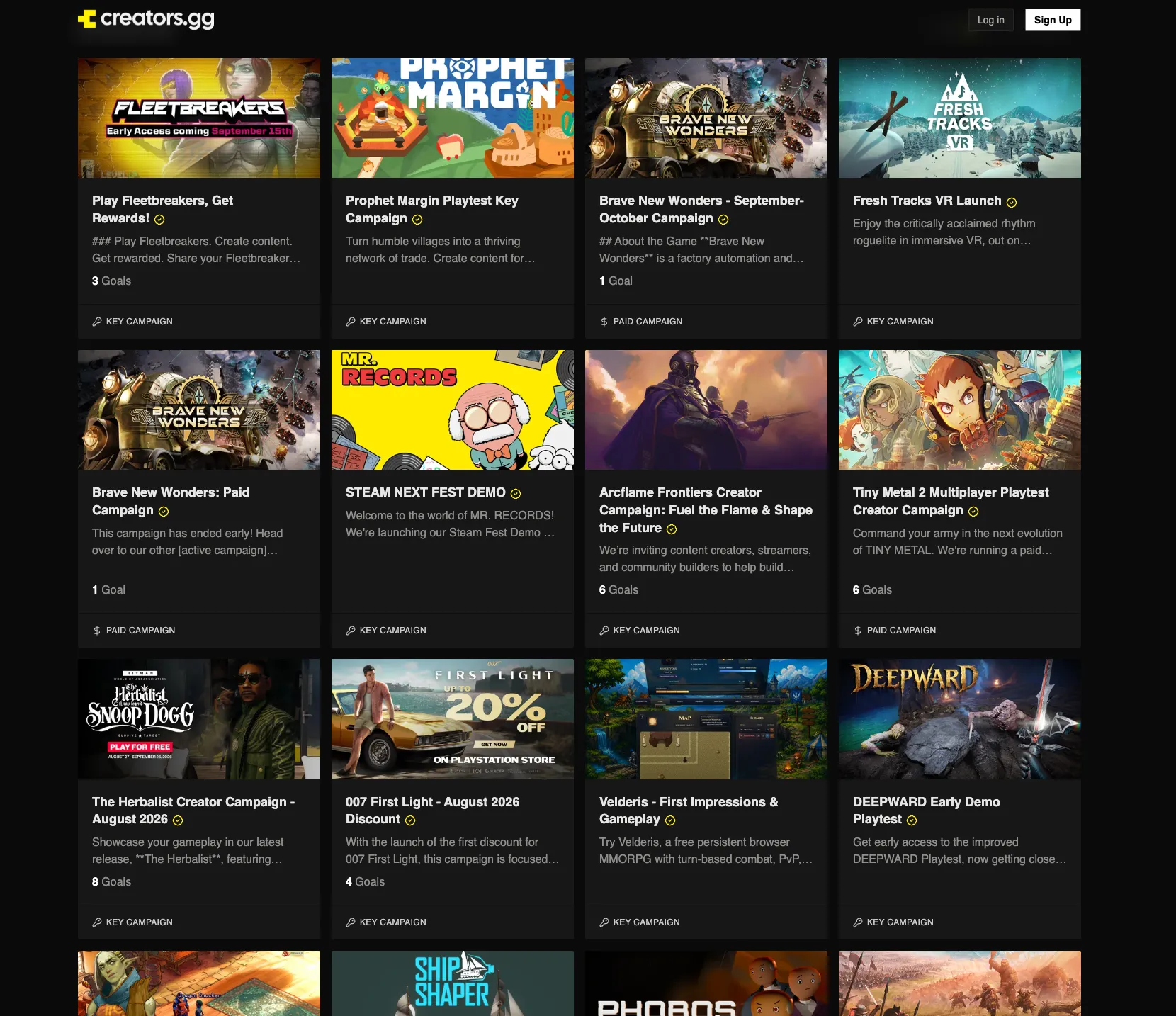
How creators find you
Section titled “How creators find you”Creators who browse creators.gg land on your page with the branding, description, and assets you’ve set. For programs, creators apply through your creator sign-up flow, which requires a paid plan, or instantly with one-click sign-ups. For campaigns, creators apply straight to the campaign.
Program applications appear in Creators → Profiles as Applied. Campaign join requests appear in that campaign’s Creators tab as Requested. Listings are also promoted across Discord and other FirstLook community channels.
Before you start
Section titled “Before you start”Make sure you have:
- A FirstLook studio account with access to the game you want to list.
- A Steam App ID or IGDB page if you want FirstLook to auto-populate the listing.
- A header or capsule image, required if you override your data sources or connect neither Steam nor IGDB.
- Any keys or cash rewards you want to offer, if you plan to run a campaign.
Listing your program
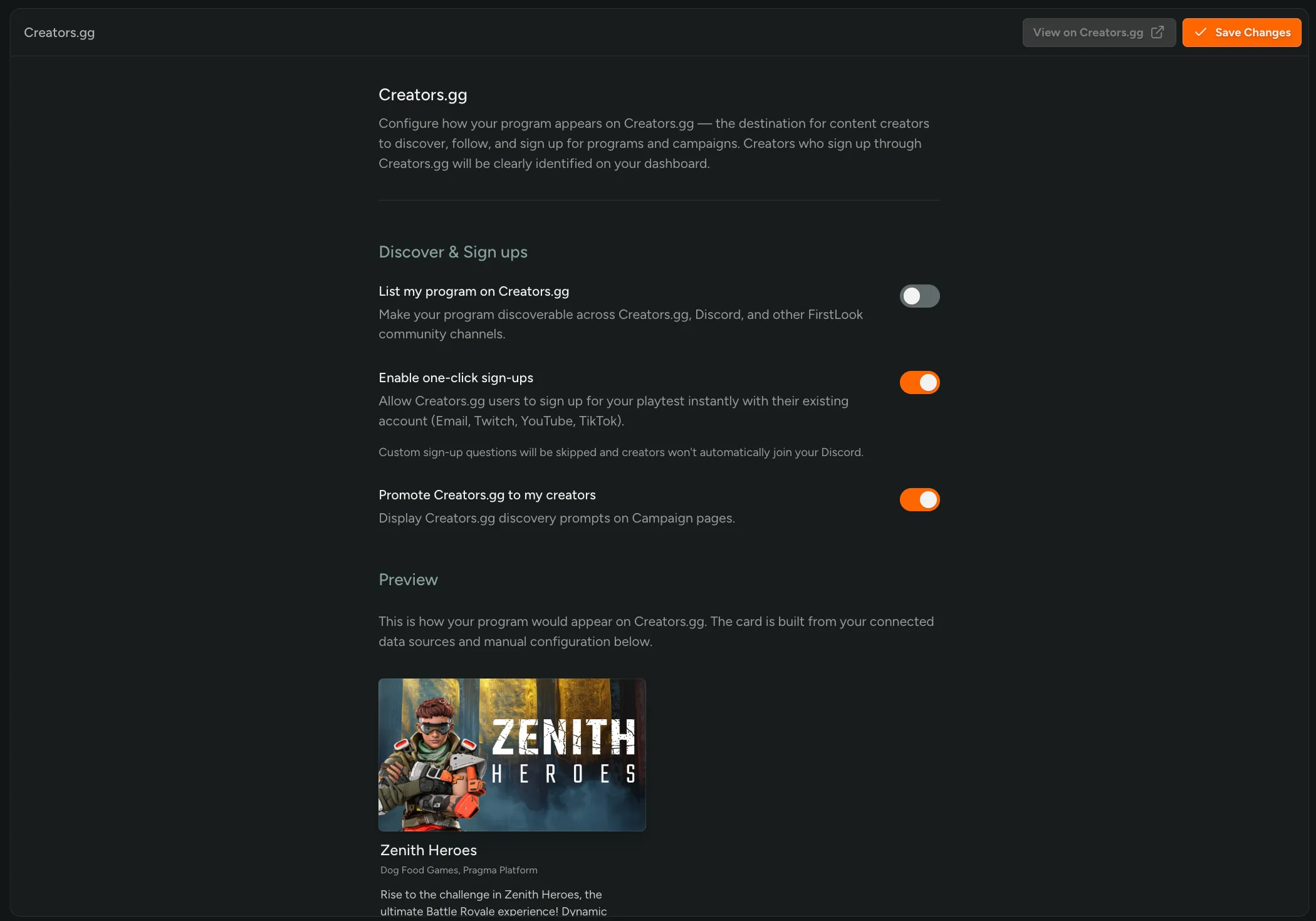
Section titled “Listing your program”Open Integrations → Creators.gg in your admin dashboard and toggle on List my program on creators.gg. This makes your program discoverable across creators.gg, Discord, and other FirstLook community channels, and opens your creator program for sign-ups. When it’s off, your program is reachable only through your own sign-up URL, which requires a paid plan.
Program Status
Section titled “Program Status”Set the status that best describes where your program is right now. This is displayed on your creators.gg page and shapes how creators understand what signing up means:
- Active — you’re accepting creators and running campaigns.
- Collect Interest — you’re gathering interest ahead of a campaign; you aren’t accepting creators yet.
Keep the status honest: if you aren’t ready to activate creators, use Collect Interest so they aren’t expecting a campaign right away.
Enable one-click sign-ups
Section titled “Enable one-click sign-ups”Lets creators.gg users sign up instantly with an existing account (Email, Twitch, YouTube, TikTok, Instagram). Any custom sign-up questions you’ve configured will be skipped, and creators won’t automatically join your Discord.
Leave it off if you rely on custom sign-up questions or Discord membership to qualify applicants, both of which require a paid plan.
After you publish
Section titled “After you publish”Once the listing is on, check your program page from a logged-out browser session and confirm:
- Branding, description, images, and trailer look correct.
- Any call-to-action links point to the right destinations.
- Sign-up sends creators into the intended flow.
- Your program status is accurate.
- Creator attribution is showing in FirstLook for sign-ups from creators.gg.
Your program page
Section titled “Your program page”Your creators.gg page — description, tags, images, screenshots, trailer, and other metadata — is automatically populated from IGDB or Steam when your game is connected. For most studios this means the page is ready to go the moment you flip the listing toggle on: no manual content work required.
Connecting data sources
Section titled “Connecting data sources”- Steam — connect your Steam App ID under Settings → Steam to pull store assets, screenshots, and trailers. See Integrate Steamworks.
- IGDB — link your IGDB entry under Integrations → Creators.gg → IGDB ID to pull catalog metadata, genres, and tags. If your game is on Steam, FirstLook can fetch the IGDB ID automatically.
When both are connected, the two sources are combined for the richest page.
Manual overrides
Section titled “Manual overrides”If your game isn’t on Steam or IGDB yet, or you want to override what’s synced, turn on Override Data Sources and fill in the Manual Configuration section:
- Title — overrides your FirstLook game name on the program page.
- Description — a short summary shown on your program page.
- About the program — the main body of the page, in Markdown.
- YouTube Trailer URL — used when no Steam trailer is available.
- Header image — recommended 1920 × 1080 px.
- Capsule image — recommended 1232 × 706 px.
- Logo — no padding recommended.
Any value you set manually takes priority over the synced Steam or IGDB equivalent. A Custom Call to Action section further down lets you add a secondary button (e.g. “Back on Kickstarter” or “View our devlogs”).
Set the creator journey
Section titled “Set the creator journey”With one-click sign-ups off, creators who apply from creators.gg land in your own creator flow, which requires a paid plan. Before publishing, review what they’ll see:
- The Sign Up screen explains what they’re applying to.
- The Waitlist screen sets expectations while you review.
- The Complete screen gives approved creators somewhere to go next.
- Your Branding uses the right logo, colors, and images.
- Any custom questions are still relevant for creators arriving from public discovery.
If custom questions aren’t essential, one-click sign-ups is the simplest journey — it requires no further setup.
Listing a campaign
Section titled “Listing a campaign”Campaigns are time-boxed pushes you want creators to take part in, like a launch, a demo week, or an update drop. On the free plan, a campaign hands out game keys to creators when they join. Paid plans add gift cards, cash payouts, and reward points, plus goals creators complete to earn them. See Campaigns for how to set one up.
Enable List on Creators.gg in that campaign’s settings to make it discoverable on creators.gg. Use a listed campaign to:
- Reach creators who aren’t in your program yet.
- Promote a single campaign without listing your whole program.
- Work with a creator once before bringing them into your program.
Creators can be accepted to a listed campaign without joining your program first — they appear in your Profiles table as Applied.
Verified creators
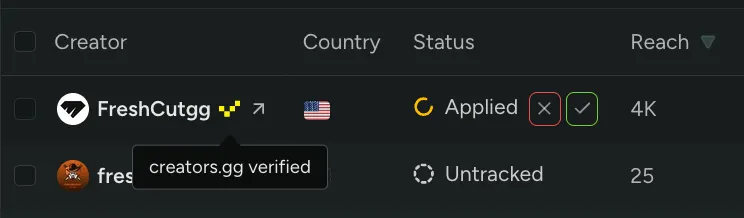
Section titled “Verified creators”Creators our creators.gg team has vetted carry a verified badge next to their name in your Profiles table. It’s a signal that the creator has been checked out on our end, so you can accept them with more confidence and move through applications faster.
Channels follow the creator
Section titled “Channels follow the creator”Creators arriving via creators.gg use the same creator profile between your game and the network, so their connected channels come with them.
Creators can connect channels from a range of platforms, but FirstLook automatically detects and tracks content on Twitch, YouTube, TikTok, and Instagram. See What content counts.
Listing guidelines
Section titled “Listing guidelines”We curate creators.gg so creators can trust what they find there. To keep your listing in good standing, and eligible for promotion across the network, make sure it meets these guidelines.
What a good listing includes
Section titled “What a good listing includes”- Honest expectations. Keep your listing accurate, and follow through on the creators you accept. For programs, set your Program Status to Active only when you’re genuinely accepting creators. For campaigns, keep the dates, goals, and rewards true to what you’ll actually deliver.
- A clear description. Creators should be able to tell what your game is, what you’re offering, and what you expect in return. Program listings fill in from Steam or IGDB, or from Manual Configuration. Campaign listings use the title and description you set on the campaign.
- An image. So your listing is recognisable across creators.gg, Discord, and other channels. Programs pull one from Steam or IGDB, or you can set your own; campaigns use the image you set on the campaign.
Keep sign-ups on the network
Section titled “Keep sign-ups on the network”Creator applications must run through creators.gg or your own FirstLook sign-up flow. Don’t point your listing at a separate application form, spreadsheet, or third-party creator tool. Keeping applications on the network is what lets us route creators into your program and track their content, goals, and payouts.
The Custom Call to Action is for sending creators somewhere else useful — a Kickstarter page, a devlog, a store page — not for routing them around your program sign-up.
Respond to creators
Section titled “Respond to creators”Creators who apply to your program, request to join a campaign, or submit content should hear back in a reasonable amount of time. Review applications from Creators → Profiles, join requests from each campaign’s Creators tab, and content from its Submissions tab, judging each against the criteria you’ve set.
If a creator hasn’t heard back in a reasonable amount of time, the FirstLook team may step in and act on your behalf, including approving or rejecting applications, join requests, and content based on your listing and campaign criteria. To keep these decisions in your hands, review regularly, or automate the parts you’re comfortable with using Auto-Accept Applications, Join Methods, and Review Mode.
What’s not allowed
Section titled “What’s not allowed”No scams, harmful games, or explicit content. Listings that mislead creators, withhold agreed rewards, charge creators to take part, or present harmful or sexually explicit material aren’t permitted on creators.gg.
Staying in good standing
Section titled “Staying in good standing”Listings that don’t meet these guidelines risk being left out of the network’s automatic and curated distribution, including our social channels, newsletters, and high-ranking spots on the creators.gg homepage. A listing that stays non-compliant, or is clearly misaligned with the spirit of these guidelines, risks being delisted or deranked.
We may update these guidelines as the network grows, and we can remove or hide a listing from creators.gg whenever we feel it’s the right call for the network. We may also edit, rename, update, or correct your listing’s data and settings to keep the page accurate and consistent. If something here is unclear or you think your program is a special case, reach out to us.
Related
Section titled “Related”- Onboarding Creators — configure the flow that creators.gg applicants land in.
- Campaigns — build the campaigns you list on the network.
- Metrics, Statuses & Payouts — what happens once creators join.