Announcement Outcomes
이 콘텐츠는 아직 번역되지 않았습니다.
Outcome reports show what recipients did after you sent them an email, including who onboarded, played, invited friends, or completed a survey. Some of this activity may have happened without the email, so treat outcomes as a signal rather than a direct result.
There are two ways to view outcomes:
- Outcomes tab: Results for a single announcement.
- Combined outcomes: Results for up to 10 selected announcements.
How it works
Section titled “How it works”Outcomes tab
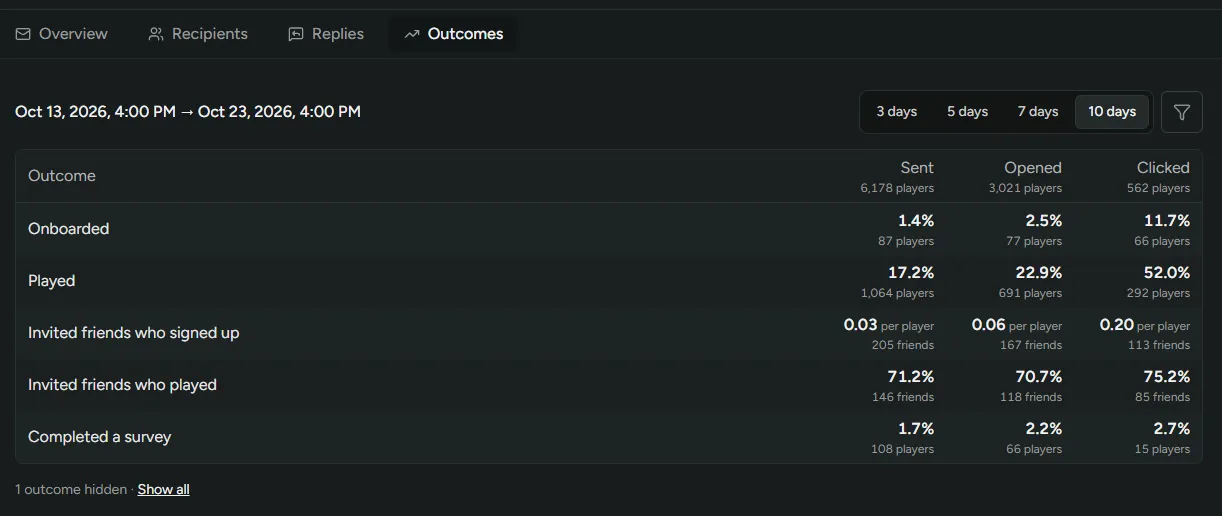
Section titled “Outcomes tab”Open any sent or scheduled announcement and select the Outcomes tab.
Combined outcomes
Section titled “Combined outcomes”In the announcements table, select up to 10 sent emails, then click the View outcomes.
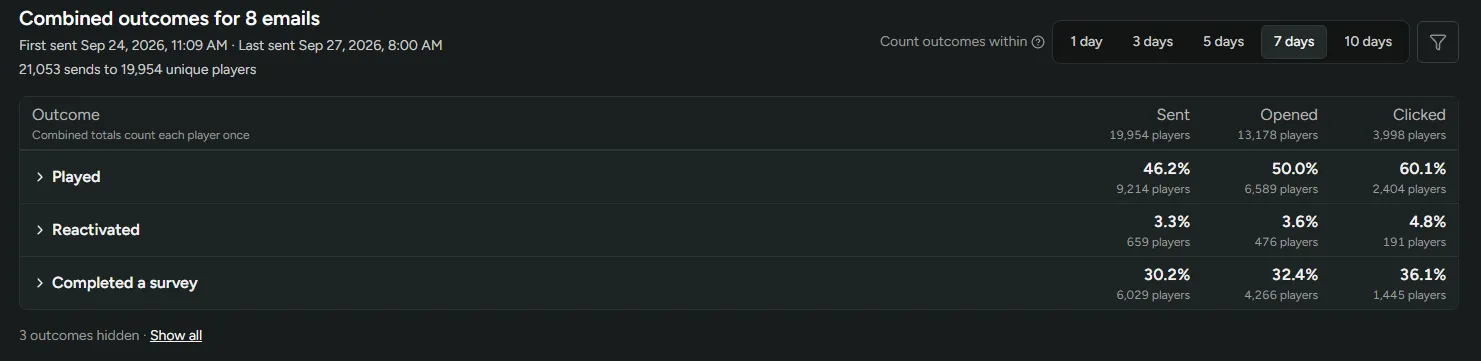
Each outcome’s top row combines all selected emails and counts each player once, even if they received several of them. Expand an outcome to see each email counted separately. A player can appear under more than one email, so the email rows won’t add up to the combined row.
Reading the report
Section titled “Reading the report”Time window
Outcomes are counted from when each email was sent. Choose 1, 3, 5, 7, or 10 days to set when counting stops.
Sent
Everyone who received the announcement.
Opened
Recipients who opened the email. Anyone who clicked a link also counts as opened. Some email clients block tracking pixels, and others load images automatically, so open counts are approximate. Clicks are more reliable.
Clicked
Recipients who clicked a link in the email.
Each group is a subset of the one before it. Column headers show the player count, and for Opened and Clicked, the percentage of Sent.
Outcomes
Each player is counted once per outcome, however many times they did it.
| Outcome | Description | Shown as |
|---|---|---|
| Onboarded | Finished onboarding. | % of the group |
| Played | Played at least one session. | % of the group |
| Reactivated | Played after having no sessions in the 14 days before the announcement. First-time players don’t count. | % of the group |
| Invited friends who signed up | Invited a friend who signed up. | Friends per player. 0.05 means 5 friends per 100 recipients. |
| Invited friends who played | Invited friends who played at least one session. | % of invited friends |
| Completed a survey | Completed any survey for your game. | % of the group |
Related
Section titled “Related”- Email Announcements: Write and send announcements
- Retention: Set up playtime tracking, required for Played and Reactivated
- Friend Invites: Let your players invite their friends
- Surveys: Create a survey