player.gg에서 홍보하기
player.gg는 게이머들이 네트워크 전반에 걸쳐 플레이테스트를 발견하고 신청할 수 있는 FirstLook의 공개 플랫폼입니다. 게임을 이곳에 등록하면 기존 커뮤니티 외부의 새로운 플레이어에게 플레이테스트를 가장 쉽게 노출시킬 수 있으며, 게임 페이지는 Steam 또는 IGDB 페이지에서 자동으로 채워집니다. 따라서 대부분의 스튜디오는 토글을 켜는 것만으로도 완전한 공개 목록을 갖추고 모든 신청이 기존 퍼널로 유입되도록 할 수 있습니다.
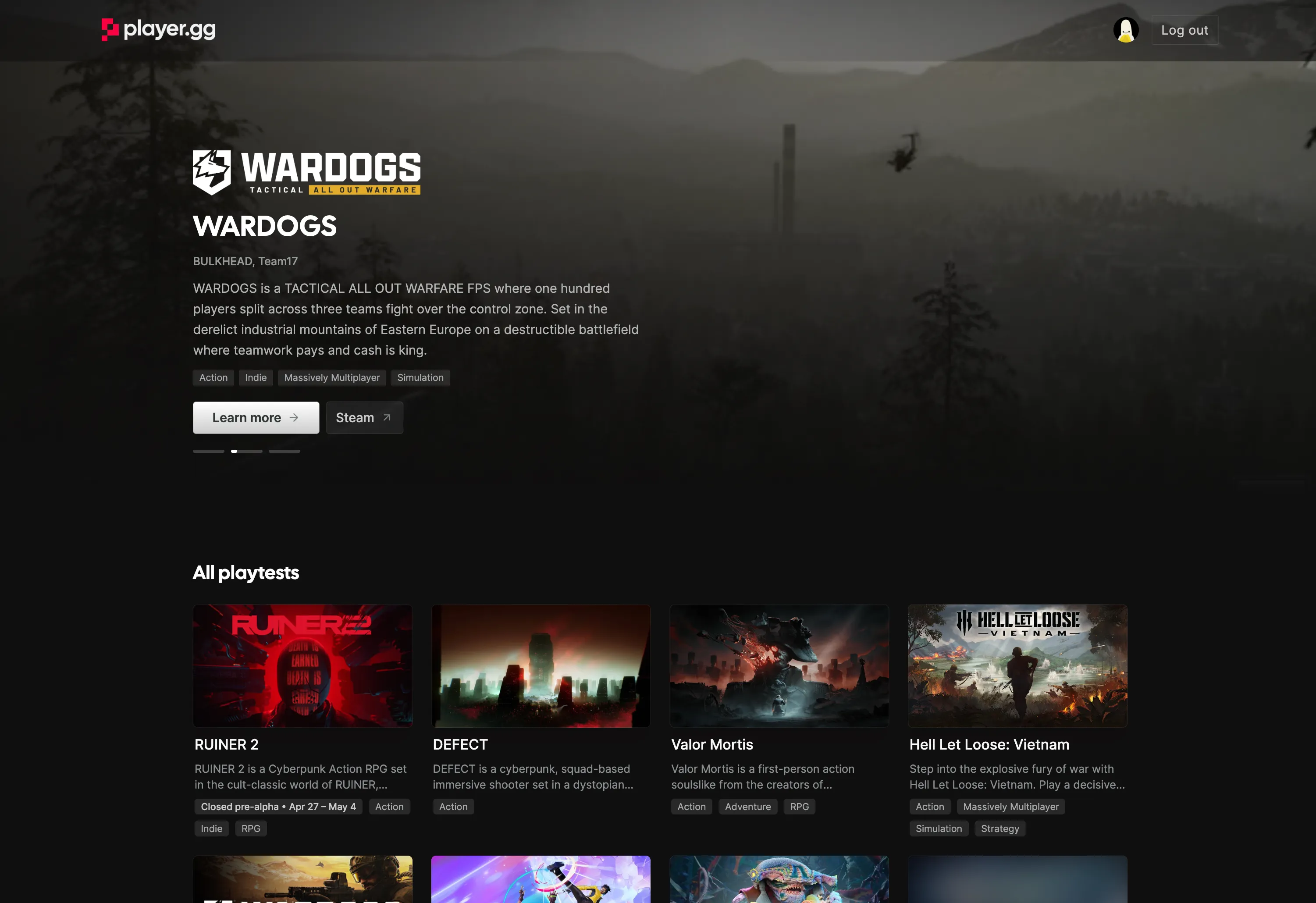
플레이어가 게임을 찾는 방법
섹션 제목: “플레이어가 게임을 찾는 방법”player.gg를 탐색하거나 Discord 추천을 통해 방문한 플레이어는 브랜딩, 설명, 태그, 트레일러, 스크린샷, 이용 가능한 플레이테스트가 포함된 공개 게임 페이지에 접속하게 됩니다. 플레이어는 그곳에서 업데이트를 팔로우하고, 플랫폼 전반에서 위시리스트에 추가하고, 직접 신청할 수 있습니다. 표준 신청 흐름을 통하거나, 이미 player.gg 사용자라면 클릭 한 번으로 신청할 수 있습니다.
player.gg에서 시작된 신청은 기본 흐름을 통해 대기자 명단으로 유입됩니다. 기존 플레이어의 대시보드에 표시되는 작은 배너는 player.gg에서 더 많은 게임을 탐색하도록 안내하여 네트워크 전반에 걸쳐 도달 범위를 넓히는 데 도움이 됩니다.
시작하기 전에
섹션 제목: “시작하기 전에”다음 사항을 확인하세요:
- 등록하려는 게임에 대한 액세스 권한이 있는 무료 FirstLook 스튜디오 계정.
- player.gg에서 참여하는 플레이어를 위한 기본 신청 흐름.
- FirstLook이 목록을 자동으로 채우길 원한다면 Steam App ID 또는 IGDB 페이지.
- 인증을 위한 Steam Publisher WebAPI Key 생성 권한.
- 홍보하려는 플레이테스트 날짜 또는 이벤트 기간.
게임이 기밀인 경우, player.gg 팀이 기밀 모드를 활성화하기 전까지 목록을 공개하지 마세요.
목록 활성화
섹션 제목: “목록 활성화”관리자 대시보드에서 Settings → Player.gg를 여세요.
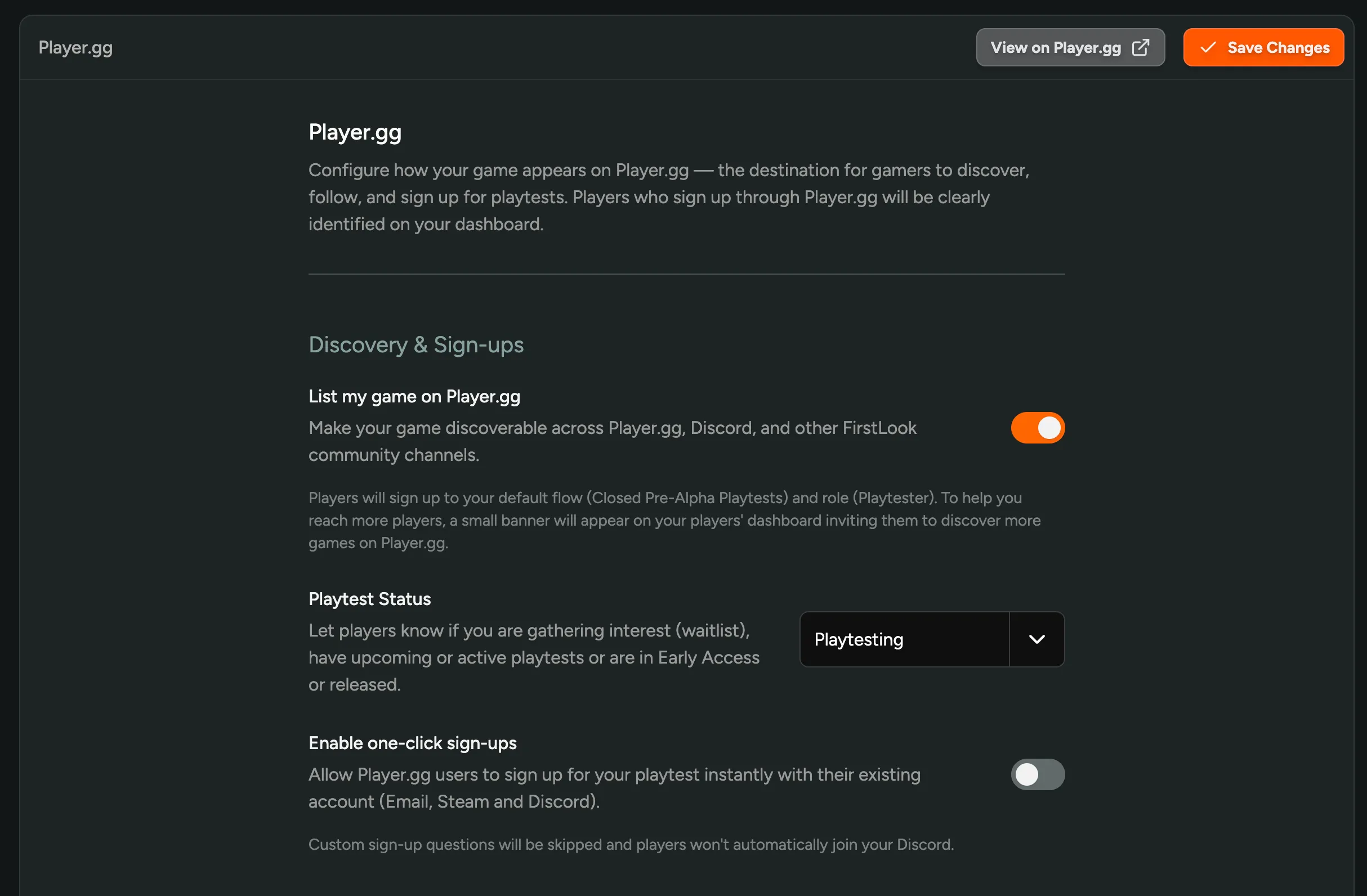
List my game on player.gg
섹션 제목: “List my game on player.gg”이 옵션을 켜면 player.gg, Discord, 기타 FirstLook 커뮤니티 채널에서 게임을 검색할 수 있게 됩니다. 끄면 게임이 공개 검색에서 숨겨지며, 자체 초대 링크, 코드, 신청 URL을 통해서만 접근할 수 있습니다.
Playtest Status
섹션 제목: “Playtest Status”현재 게임 상태를 가장 잘 설명하는 상태를 설정하세요. 이는 player.gg 페이지에 표시되며 플레이어가 신청의 의미를 이해하는 방식을 형성합니다:
- Waitlist — 관심을 모으고 대기자 명단을 구축 중이며, 아직 플레이테스트가 진행 중이지 않습니다.
- Playtesting — 플레이테스트가 진행 중이며 플레이어를 초대할 수 있습니다.
- Early Access — 비공개 테스트 외부에서 게임을 플레이할 수 있습니다.
- Released — 게임이 출시되었습니다.
- Cancelled — 프로젝트가 더 이상 활성 상태가 아닙니다.
예정된 테스트의 경우 상태를 정직하게 유지하세요: 빌드가 아직 라이브 상태가 아니라면 Waitlist를 사용하고 계획된 날짜와 함께 Playtesting Event를 추가하세요.
Enable one-click sign-ups
섹션 제목: “Enable one-click sign-ups”원클릭 신청을 활성화하면 player.gg 사용자가 기존 Email, Steam, 또는 Discord 계정을 사용하여 즉시 플레이테스트에 참여할 수 있습니다. 설정한 커스텀 신청 질문은 건너뛰게 되며, 플레이어는 Discord 서버에 자동으로 참여하지 않습니다.
지역 선택, 하드웨어 확인, Discord 라우팅 등을 위해 커스텀 신청 질문이나 Discord 멤버십으로 대기자를 검증하는 경우에는 끄세요.
게시 후
섹션 제목: “게시 후”목록이 활성화되면 로그아웃된 브라우저 세션에서 게임 페이지를 확인하고 다음 사항을 검토하세요:
- 브랜딩, 설명, 스크린샷, 트레일러가 올바르게 표시되는지 확인.
- 위시리스트 및 스토어 링크가 올바른 목적지를 가리키는지 확인.
- 신청 버튼이 플레이어를 의도한 흐름으로 보내는지 확인.
- 플레이테스트 상태와 이벤트 날짜가 정확한지 확인.
- player.gg에서 유입된 신청에 대한 플레이어 어트리뷰션이 FirstLook에 표시되는지 확인.
게임 페이지
섹션 제목: “게임 페이지”player.gg 페이지(설명, 태그, 이미지, 스크린샷, 트레일러, 기타 메타데이터)는 게임이 연결되면 IGDB 또는 Steam에서 자동으로 채워집니다. 대부분의 스튜디오에서는 목록 토글을 켜는 순간 페이지가 준비 완료 상태가 됩니다. 수동 콘텐츠 작업이 필요하지 않습니다.
데이터 소스 연결
섹션 제목: “데이터 소스 연결”- Steam — **Settings → Steam**에서 Steam App ID를 연결하여 스토어 에셋, 스크린샷, 트레일러, 위시리스트 라우팅을 가져오세요. Steam 소유권 인증은 특정 Steam 관련 기능과 player.gg에 게임을 등록하는 데 필요합니다. WebAPI Key 설정은 Steamworks 통합을, Steam 플레이테스트 안내는 Steam Keys, Branches, Playtests 이해하기를 참조하세요. Steam WebAPI Key가 스튜디오에서 사용 불가한 경우, 대체 인증 옵션에 대해 FirstLook 지원팀에 문의하세요.
- IGDB — Settings → Player.gg → IGDB ID에서 IGDB 항목을 연결하여 카탈로그 메타데이터, 장르, 태그를 가져오세요. 게임이 Steam에 있다면 FirstLook이 IGDB ID를 자동으로 가져올 수 있습니다.
둘 다 연결하면 두 소스가 결합되어 가장 풍부한 페이지를 구성할 수 있습니다.
수동 재정의
섹션 제목: “수동 재정의”게임이 아직 Steam이나 IGDB에 없거나 동기화된 내용을 재정의하려는 경우, player.gg 설정 페이지의 Manual Configuration 섹션에서 다음을 설정할 수 있습니다:
- Description — 게임 페이지에 표시되는 짧은 요약.
- YouTube Trailer URL — Steam 트레일러를 사용할 수 없을 때 사용됩니다.
- Header image — 1920 × 1080 px 권장.
- Logo — 패딩 없음 권장.
수동으로 설정한 값은 동기화된 Steam 또는 IGDB 동등 항목보다 우선 적용됩니다. 아래의 Custom Call to Action 섹션에서는 자동으로 표시되는 “Wishlist on Steam” 버튼 옆에 보조 버튼(예: “Back on Kickstarter”, 뉴스레터 구독, “View our devlogs”)을 추가할 수 있습니다.
플레이어 여정 설정
섹션 제목: “플레이어 여정 설정”player.gg에서 게임을 발견한 플레이어는 기본 대기자 명단 흐름으로 보내집니다. 게시하기 전에 신청 후 플레이어에게 표시될 내용을 검토하세요:
- Sign Up 화면은 플레이어가 참여하는 내용을 설명합니다.
- Waitlist 화면은 다음 단계에 대한 기대치를 설정합니다.
- Complete 화면에는 Discord 참여 또는 위시리스트 추가와 같은 유용한 행동 유도가 포함됩니다.
- Branding 설정이 이 게임에 맞는 올바른 로고, 색상, 이미지를 사용하는지 확인합니다.
- 커스텀 질문이 공개 검색을 통해 유입된 플레이어에게도 여전히 관련성이 있는지 확인합니다.
대기자를 검증하는 데 커스텀 질문이 필수적이지 않다면, 가장 간단한 여정은 원클릭 신청을 켜는 것입니다. 추가 설정이 필요하지 않습니다.
Playtesting Events
섹션 제목: “Playtesting Events”이벤트는 플레이어에게 알리고 싶은 특정 플레이테스트 기간입니다. 비공개 프리알파 주말, 베타 테스트, 스트레스 테스트, 데모 기간 등이 이에 해당합니다. 각 이벤트는 날짜와 함께 player.gg 페이지에 표시되며, 해당 날짜 전후로 네트워크 전반에서 게임이 추가 홍보됩니다.
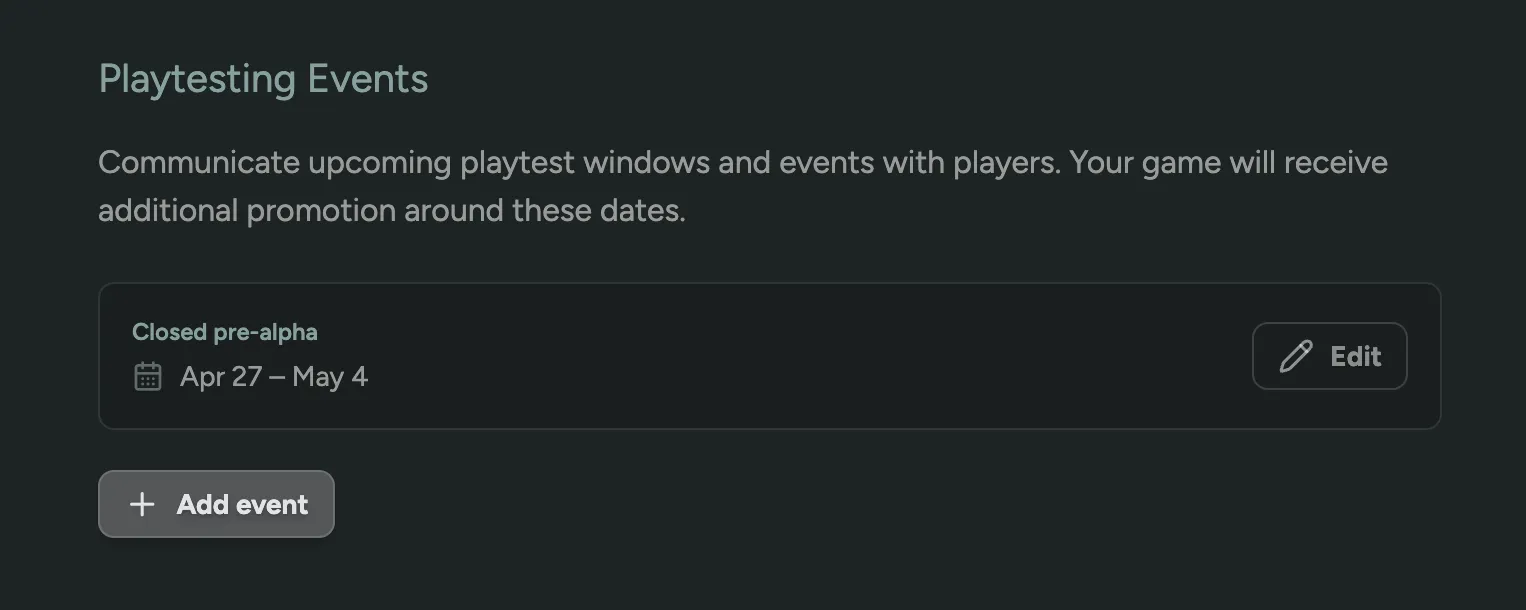
Add event를 클릭하여 새 기간을 게시하거나 Edit를 클릭하여 기존 기간의 날짜를 조정하세요. 이벤트를 다음 목적으로 활용하세요:
- 관심 있는 플레이어가 미리 신청할 수 있도록 다음 플레이테스트를 예고합니다.
- 기존 대기자 명단에만 의존하지 않고 특정 테스트 주말을 중심으로 player.gg에서 유기적인 신청을 유도합니다.
- 대시보드의 플레이어에게 기대치를 정할 수 있는 명확한 “다음 플레이테스트” 날짜를 제공합니다.
- 전체 흐름을 변경하지 않고 제한된 기간을 홍보합니다.
- 플레이테스트가 항상 열려 있지 않을 때 플레이어에게 정보를 제공합니다.
기밀 게임
섹션 제목: “기밀 게임”player.gg는 엄격한 기밀 유지가 필요한 게임에도 사용할 수 있습니다. 기밀 모드에서는 게임 이름과 직접 설정한 브랜딩 및 설정만 플레이어에게 표시됩니다. 스튜디오 이름, Steam 데이터, 기타 카탈로그 세부 정보는 공개되지 않습니다. 플레이어는 여전히 플레이테스트를 발견하고 신청할 수 있지만, 공개 발표는 완전히 통제 가능합니다.
기밀 모드는 요청에 의해 player.gg 팀이 활성화합니다. 게임이 NDA 대상이거나, 미발표 상태이거나, 코드명으로 운영 중인 경우 목록 등록 전에 FirstLook에 문의하여 게임을 기밀로 표시하세요.
목록 가이드라인
섹션 제목: “목록 가이드라인”플레이어가 신뢰할 수 있는 콘텐츠를 제공하기 위해 player.gg를 큐레이션하고 있습니다. 목록이 양호한 상태를 유지하고 네트워크 전반에서 홍보 자격을 유지하려면 다음 가이드라인을 충족하는지 확인하세요.
좋은 목록에 포함되는 것
섹션 제목: “좋은 목록에 포함되는 것”- 정직한 기대치. 상태, 이벤트 날짜, 미디어를 정확하게 유지하고 수집한 신청에 대해 약속을 이행하세요. 플레이어는 목록이 약속한 것을 받아야 합니다. 예를 들어, 플레이테스트가 실제로 진행 중이거나 임박한 경우에만 Playtesting으로 상태를 설정하세요. 아직 관심을 모으는 중이라면 플레이어가 키가 곧 도착할 것으로 기대하지 않도록 Waitlist를 사용하세요.
- 명확한 게임 설명. 플레이어는 게임이 무엇인지, 무엇에 신청하는지 알 수 있어야 합니다. Steam 또는 IGDB에서 자동으로 채워집니다. 수동 설정을 사용하는 경우 게임을 설명하는 내용을 작성하세요.
- 캡슐 이미지. player.gg, Discord, 기타 채널에서 게임을 인식할 수 있도록 헤더 이미지 또는 로고를 추가하세요. 게임이 연결되면 Steam 또는 IGDB에서도 가져옵니다.
- 인증된 스토어 페이지. 실제 Steam 또는 IGDB 페이지에 목록을 연결하세요. 스토어 페이지가 없거나 인증되지 않았거나 일치하지 않는 목록은 연결될 때까지 홍보 자격이 없을 수 있습니다. Steam 이전 및 미발표 게임은 기밀 모드를 통해 등록할 수 있습니다.
네트워크 내에서 신청 유지
섹션 제목: “네트워크 내에서 신청 유지”플레이테스트 신청은 player.gg 또는 firstlook.gg를 통해 진행되어야 합니다. 목록을 다른 신청 웹사이트, 양식, 또는 도구로 연결하지 마세요. 네트워크 내에서 신청을 유지하는 것이 플레이어를 퍼널로 라우팅하고 효과를 측정할 수 있게 해줍니다.
허용되지 않는 것
섹션 제목: “허용되지 않는 것”사기, 유해한 게임, 노골적인 콘텐츠는 허용되지 않습니다. 플레이어를 오도하거나, 사기를 치거나, 유해하거나 성적으로 노골적인 내용을 담은 목록은 player.gg에서 허용되지 않습니다.
양호한 상태 유지
섹션 제목: “양호한 상태 유지”이 가이드라인을 충족하지 못하는 목록은 소셜 채널, 뉴스레터, player.gg 홈페이지의 상위 노출을 포함한 네트워크의 자동 및 큐레이션 배포에서 제외될 수 있습니다. 가이드라인을 지속적으로 준수하지 않거나 가이드라인의 정신에 명백히 어긋나는 목록은 제거되거나 순위가 낮아질 수 있습니다.
네트워크가 성장함에 따라 이 가이드라인을 업데이트할 수 있으며, 네트워크에 적합하다고 판단될 때마다 player.gg에서 목록을 제거하거나 숨길 수 있습니다. 또한 페이지를 정확하고 일관성 있게 유지하기 위해 목록의 데이터와 설정을 편집, 이름 변경, 업데이트 또는 수정할 수 있습니다. 내용이 불분명하거나 게임이 특별한 경우라고 생각되면 문의하세요.
관련 항목
섹션 제목: “관련 항목”- 플레이어 초대 — player.gg를 통해 수집한 유기적 신청자를 초대합니다.
- 플로우 설정 가이드 — player.gg 신청자가 참여 후 보게 될 내용을 커스터마이즈합니다.