Configure Roles and Access
Role Setup Examples
Section titled “Role Setup Examples”Before setting up roles, it’s important to think about what you’re trying to achieve with a given user’s access.
A role in FirstLook isn’t just a label — it defines how a user experiences your project: what they see, what they can do, and what kind of communication they may receive.
When designing roles, start by asking three questions:
- Who are they? — Developers, players, creators, partners, or press.
- What should they access? — Which types of keys, flows, and communication channels apply to them.
- What context do they need? — What information should they see, and what should be hidden or simplified.
Your goal is to create clear, predictable experiences for every audience.
Each role should set expectations, grant appropriate access, and guide users toward the right behavior — whether that’s testing gameplay, previewing content, or sharing feedback.
Below, we walk you through some of the more common roles and experiences studios have utilized.
Internal Team – Developers
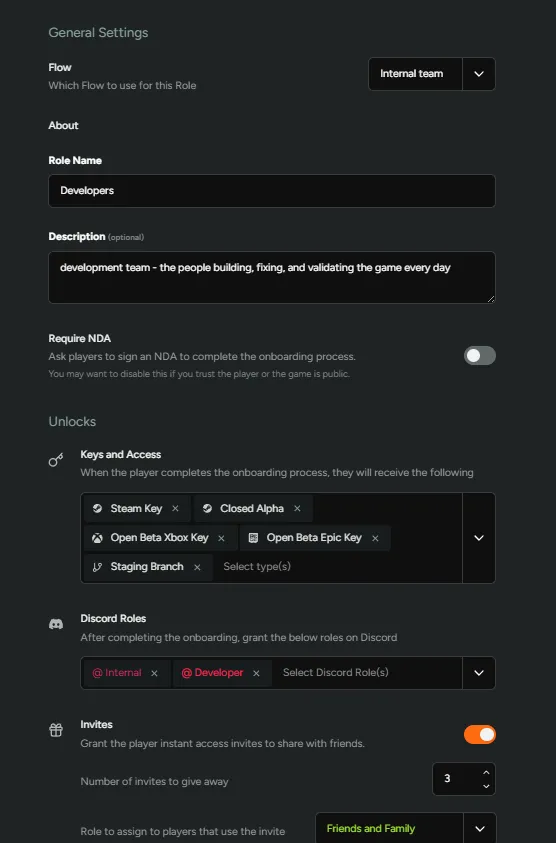
Section titled “Internal Team – Developers”This role is designed for your development team — the people building, fixing, and validating the game every day.
Members of this group use the Internal Team flow, where no NDA is required because they’re already part of the studio.
They receive access to all key pools, including both internal and public builds, so they can quickly switch between versions to verify behavior, reproduce bugs, and test work-in-progress changes.
On Discord, they’re automatically assigned the Developer and Internal roles, giving them access to dev-only channels.
They also have permission to invite Friends & Family directly in order to help extend early access without needing manual admin approval.
This configuration prioritizes speed and flexibility. Developers generally need the most access, and removing unnecessary friction prevents bottlenecks in the testing pipeline.
Internal Team – Non-Developers
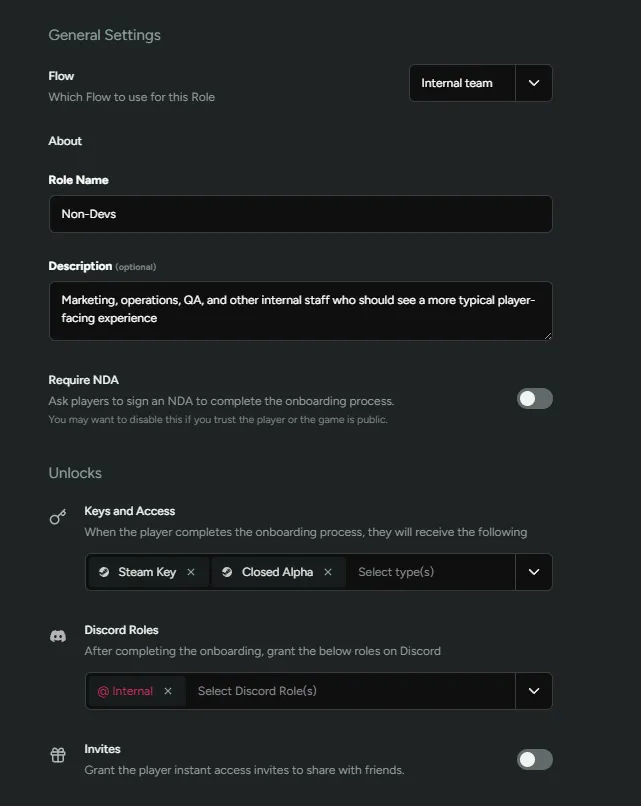
Section titled “Internal Team – Non-Developers”This group includes marketing, operations, QA, and other internal staff who should see a more typical player-facing experience rather than all internal development branches.
They also use the Internal Team flow, without an NDA, and receive builds that are generally designed to go public at some future date.
This allows them to experience the same gameplay, polish, and onboarding that public testers will see — invaluable context when preparing campaigns, collecting feedback, testing upcoming releases, or writing patch notes.
In Discord, they’re assigned the Internal role, granting access to relevant internal discussion channels.
Unlike developers, they can’t issue invites themselves.
This setup ensures internal team members stay aligned with what external testers experience, keeping feedback grounded in the real player journey.
Investors, Press, and Media Partners
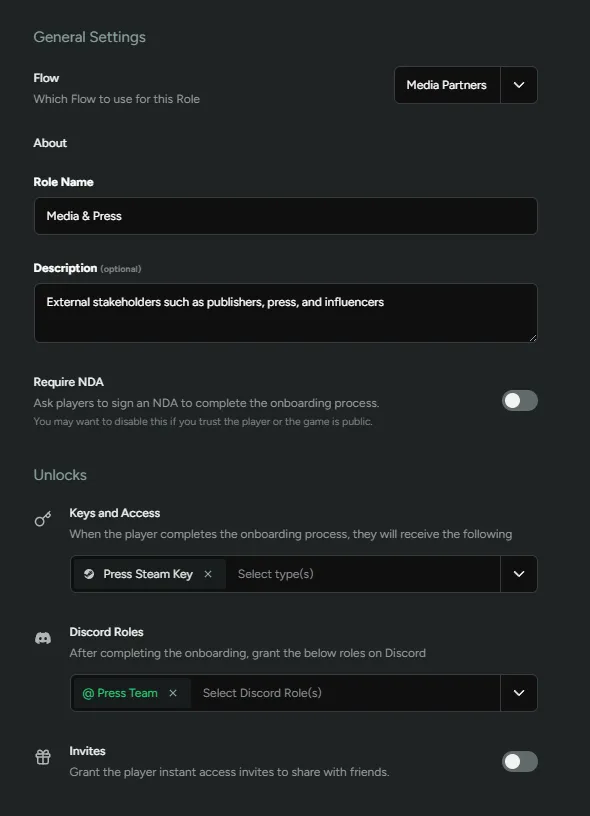
Section titled “Investors, Press, and Media Partners”External stakeholders such as publishers, press, and influencers require a polished and controlled experience. Their goal isn’t to test; it’s to preview.
They use the Media Partners flow, which streamlines onboarding and focuses on presentation.
In this case, we are not going to require an NDA, but if your studio wants to protect embargoed details, it can easily be included as a required step.
These users receive keys tied to stable, press-ready builds and automatically join the Press Team Discord role.
They do not receive invite permissions or access to development channels but might have limited press-specific channels.
This setup ensures that when someone outside your studio is capturing footage, streaming, or writing coverage, they only see a version that represents your best foot forward.
Friends & Family
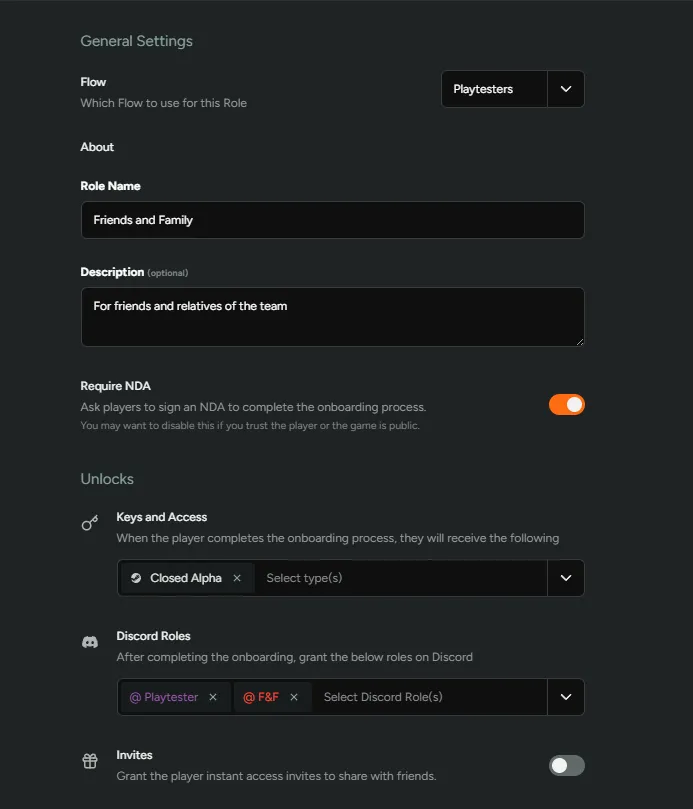
Section titled “Friends & Family”This group represents early supporters — people close to your team who you trust to give honest feedback but who probably shouldn’t have access to all builds.
They onboard through the Playtesters flow, where an NDA is required to set expectations around confidentiality.
They receive Alpha keys (and later Beta keys) that match near-public builds and are automatically tagged with the Playtester and Friends & Family Discord roles.
Friends and Family testers often participate before the general public.
This setup lets them see the same experience as public players — but sooner — and their candid, informal feedback can help uncover rough edges before larger tests begin.
Closed Alpha Testers
Section titled “Closed Alpha Testers”This group consists of selected public players chosen from your waitlist based on hardware specs, survey responses, or play habits.
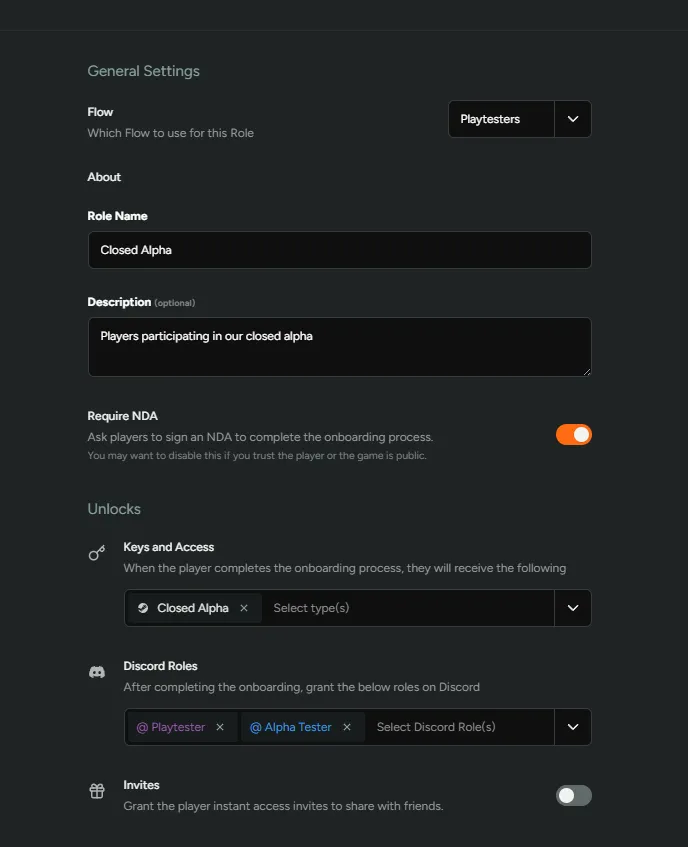
They use the Playtesters flow, sign an NDA, and receive Closed Alpha keys once invited.
On Discord, they’re given the Playtester and Alpha Tester roles, placing them in feedback-focused channels where discussion is more structured.
Closed Alphas are meant for focused, high-value feedback under controlled conditions.
By gating access and filtering who’s invited, studios can test stability, balance, and retention before scaling up.
Open Beta Testers
Section titled “Open Beta Testers”This is your broadest audience — the group for large-scale testing and final feedback before launch.
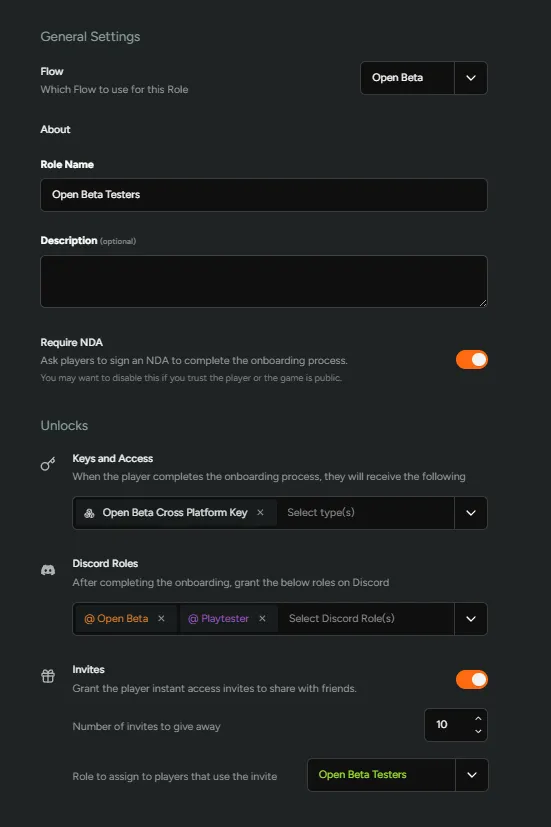
Players join through the Open Beta flow, which emphasizes simplicity.
Because this is a public playtest, no NDA is required, and the onboarding process is intentionally lightweight.
They receive Open Beta keys and are automatically granted the Playtester and Open Beta Discord roles.
To help drive organic reach, this group may be allowed to invite a small number of friends — typically around 10.
The goal here is frictionless participation.
Open Betas focus on volume: gathering performance data, testing matchmaking, and ensuring the onboarding experience feels effortless and welcoming.
Each of these configurations demonstrates a different balance between access, control, and communication.
For your setup, start with the roles that make sense for your current testing stage, and adjust as your program matures — expanding access, revising NDAs, or changing invite permissions over time.