Retention and Events
Retention Labs
Section titled “Retention ”Track how your players are engaging with your game over time using data collected directly from the game client via the FirstLook SDK. Use the date picker to select a time range — the graphs will automatically bucket values by hour, day, or week depending on the window you’ve chosen.
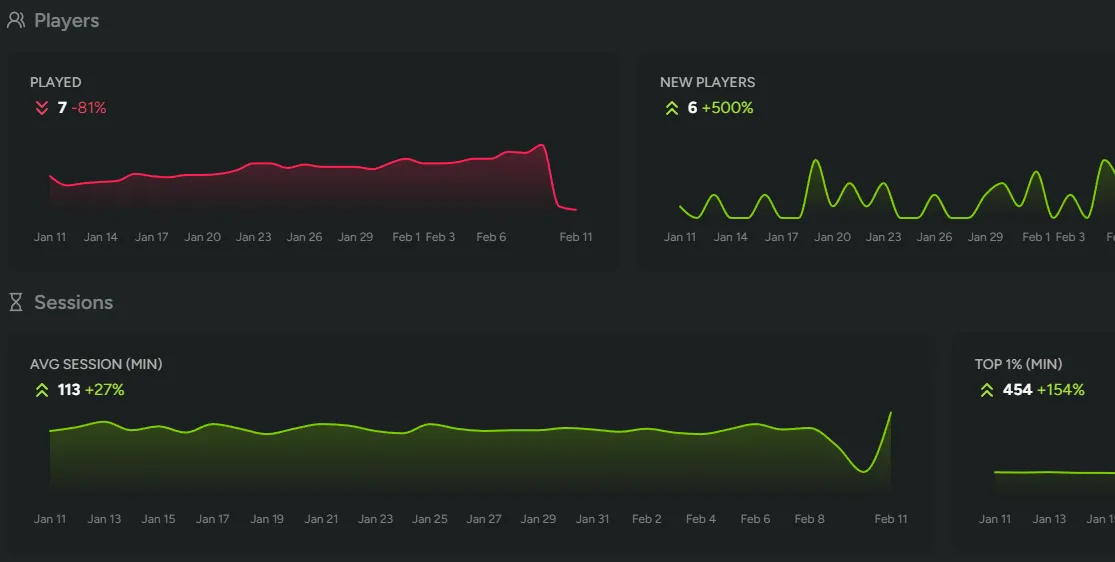
Players
Section titled “Players”Get a high-level view of your player population across the selected time range:
- Played - The number of unique players who launched a session.
- New Players - First-time players who were seen for the first time during this period.
- Total Players - Your cumulative player count.
Sessions
Section titled “Sessions”Understand how long players are spending in your game per session:
- Average Session Length - The mean session duration in minutes across all players.
- Top 1% Session Length - How long your most engaged players are playing, measured by the 99th percentile session duration.
Classic Retention
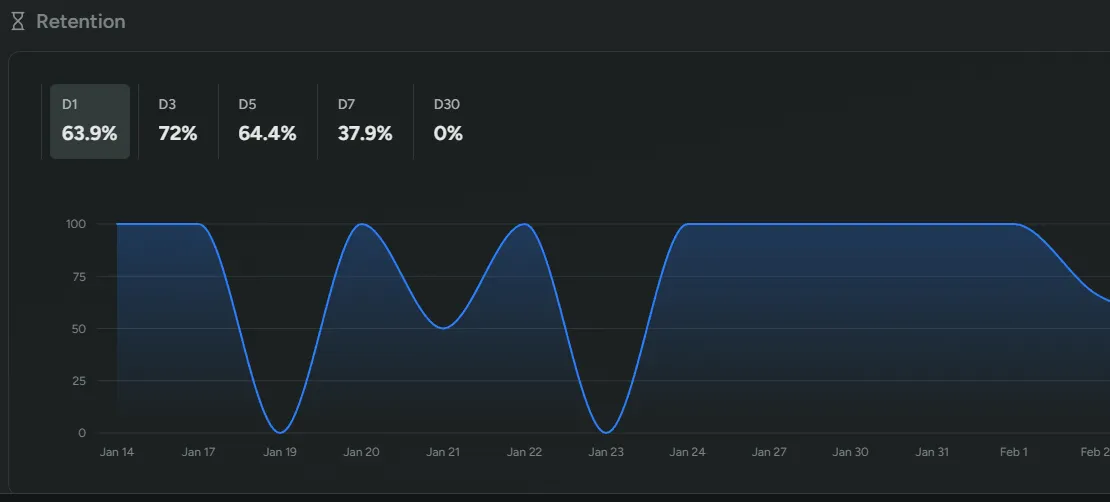
Section titled “Classic Retention”Measure how well your game brings players back with classic day-based retention:
- Classic Retention - D1, D3, D5, D7, D30.
Classic retention tracks the percentage of a cohort that returns on a specific day after first playing. For example, D1 retention tells you how many players came back the very next day, while D30 gives you a picture of long-term stickiness. These metrics are especially useful for evaluating onboarding effectiveness and sustained engagement.
Events Labs
Section titled “Events ”Monitor custom gameplay events that your studio has instrumented through the FirstLook SDK. Each event consists of two parts:
- Name - A dot-separated identifier following the pattern
<category>.<event-name>, such asmatch.killsorstore.purchase. - Value - A non-zero integer representing a count or quantity.
Events are charted individually and grouped by their category prefix, making it easy to compare related metrics at a glance. For details on sending events from your game client, see the SDK Setup guide.
Duration Events Labs
Section titled “Duration Events ”Track how long in-game activities take using duration events from the FirstLook SDK. While counter events record that something happened, duration events measure how long it lasted — match length, time spent in a menu, loading times, or any other timed span.
Each duration event is defined by:
- Name - A dot-separated identifier following the same
<category>.<event-name>pattern as counter events, such asmatch.roundormenu.loadout. - Start / End - The SDK records timestamps when you call
StartDurationEventandEndDurationEvent. FirstLook calculates the elapsed time automatically.
Duration events are displayed on the Events tab with three graphs per event:
- Count - How many times the event was completed in each time bucket.
- Average Duration (min) - The mean duration in minutes across all players.
- Top 1% Duration (min) - The average duration among the top 1% longest instances, measured by the 99th percentile. This highlights your most extreme outliers — useful for spotting unusually long matches, stalled loading screens, or other activities that may warrant investigation.
Like counter events, duration events are grouped by their category prefix. Use the date picker to select a time range, and the graphs will automatically bucket by hour, day, or week. For implementation details, see the SDK Setup guide.